
The Hidden Infrastructure Behind Effective B2B Email Outreach
Estimated reading time: 8 minutes
On almost every discovery call we do, we ask about email workflow and infrastructure. It's one of the first things we dig into because we offer managed email infrastructure as part of our prospecting platform.
The answer is almost always the same: "We just send from our regular business emails."
This is the moment we wince.
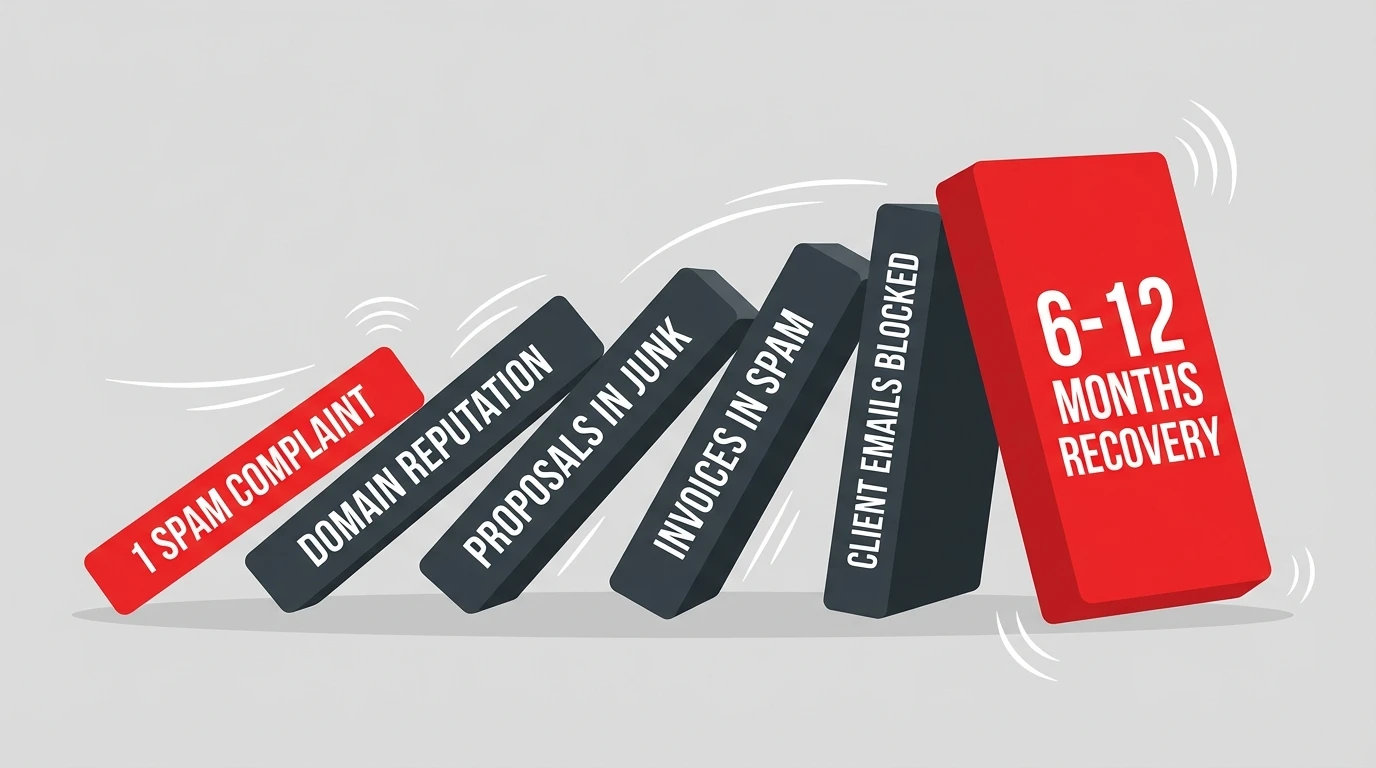
If you're doing cold outreach from your primary domain—the same one you use for client communication, invoices, and proposals—you're one spam complaint away from tanking your entire company's email reputation. Not just your outreach. Your operations emails. Your invoices. Everything.
We've seen it happen. A sustainability consultant scales their outreach, gets a few spam complaints, and suddenly their proposals to existing clients are landing in junk folders. That's not a hypothetical—it's why we wrote this guide.
Here's the stat that should make you pause: teams without proper email infrastructure see deliverability drop from 95% to under 50% within 3-6 months of scaling.
And here's the kicker: rebuilding that reputation takes 3-12 months depending on severity. The asymmetry is brutal. You can destroy your sender reputation in weeks, but recovery is measured in quarters.
If you're selling carbon credits, sustainability consulting, or ESG services, you've probably invested serious time in your outreach messaging. You've researched your prospects. You've written compelling copy about their net-zero commitments and decarbonization challenges. Maybe you've even personalized each email with details from their CDP reports or Verra retirements.
And yet, the replies aren't coming.
The brutal truth: your emails might never be reaching the inbox at all.
Most sustainability sellers come from technical backgrounds—environmental science, engineering, policy. Sales ops and email infrastructure aren't exactly core curriculum. But here's what the most effective outreach teams have figured out: the technical foundation of your email setup is what separates 95%+ inbox placement from burning through domains every quarter.
This isn't about writing better subject lines. It's about the unglamorous plumbing that makes those subject lines visible in the first place.
Why Your Emails Aren't Landing
Let's start with math that most people get wrong.
Say you want to send 1,000 emails per day. Reasonable goal for scaling outreach, right? Here's what that actually requires:
- Safe sending limit: 30-50 emails per mailbox per day
- To send 1,000/day: You need 33+ mailboxes
- Across: 7+ separate domains (max 3-4 mailboxes per domain)
That's not a typo either. If you're sending 300 emails a day from 3 mailboxes on a single domain, you're not just underperforming—you're actively destroying your sender reputation.
But volume is only part of the equation. In February 2024, Google and Yahoo rolled out strict authentication requirements for bulk senders. If you're sending more than 5,000 emails daily, you now need SPF, DKIM, and DMARC properly configured. Microsoft followed in May 2025 with similar requirements for Outlook, Hotmail, and Live.com.
The impact? Authenticated senders are 2.7x more likely to reach the inbox than unauthenticated senders.
Yet here's the gap: only 7.6% of domains actually enforce DMARC. Which means most of your competitors are still getting this wrong—and you can use that to your advantage.
The Infrastructure Stack You Actually Need
Let's break down what proper email infrastructure looks like.
Domain Strategy
Never use your primary business domain for cold outreach. Full stop.
One angry prospect marking your email as spam can tank your entire company's email deliverability—including the emails your operations team sends to existing clients.
Instead, buy secondary domains that are recognizable variations of your brand:
tryemitree.comgetemitree.ioemitreehq.com
Use .com or .io domains. Avoid .co (poor deliverability), .biz, and .online (spam-associated). No hyphens or numbers in domain names.
Pro tip: always set up redirects from secondary domains to your primary website. If a prospect types your sending domain into their browser, they should land on your real site—not a parked page.
Email Provider Selection
For B2B cold outreach, your two realistic options are Google Workspace and Microsoft 365.
Google Workspace ($6/user/month):
- 2,000 messages/day limit
- Simpler SPF/DKIM setup
- Rarely blacklisted IPs
- Best for: beginners, lower volume
Microsoft 365 ($5/user/month):
- 10,000 recipients/day limit
- More complex setup
- Higher volume ceiling
- Best for: scaling, experienced teams
Here's the insight most people miss: there's a "home field advantage." Gmail delivers best to Gmail inboxes. Outlook delivers best to Outlook inboxes. Since these two providers host roughly 65% of business email addresses, consider using both and matching your sending provider to your prospect's email provider.
Authentication (SPF, DKIM, DMARC)
These three DNS records are no longer optional—they're mandatory for serious outreach.
SPF (Sender Policy Framework): Tells email servers which IP addresses are allowed to send email from your domain.
DKIM (DomainKeys Identified Mail): Adds a cryptographic signature to verify your emails haven't been tampered with in transit.
DMARC (Domain-based Message Authentication): Combines SPF and DKIM, and tells receiving servers what to do with emails that fail authentication.
Implementation order matters:
- Set up SPF first (immediate)
- Add DKIM (propagation takes up to 48 hours)
- Configure DMARC (wait 48 hours after SPF+DKIM)
Start with DMARC policy set to p=none (monitoring only), then gradually move to quarantine and eventually reject as you verify everything is working.
Use MXToolbox, mail-tester.com, or Mailgenius to verify your setup. These tools will tell you exactly what's misconfigured.
The Warm-up Protocol
New email accounts have no sender reputation. If you start blasting cold emails from a fresh mailbox, you'll land in spam immediately.
Warm-up is the process of gradually building sending reputation by exchanging emails with established accounts—mimicking normal human email behavior.
Timeline matters more than you think:
- 2-week warm-up: baseline
- 3-week warm-up: 30% higher open rates
- 4-week warm-up: recommended for serious campaigns
Weekly progression:
| Week | Emails/Day/Inbox | Notes |
|---|---|---|
| 1 | 10-20 | Only warm, relevant contacts |
| 2 | 20-30 | Add follow-up sequences |
| 3 | 30-40 | Monitor metrics closely |
| 4+ | 40-50 | Maintain 40% warmup volume |
That last point is critical: even after warm-up, you should keep 40% of your daily volume as warmup emails. So if you're sending 30 cold emails per inbox, you should also be sending 10-20 warmup emails to maintain your sender reputation.
Tools like Instantly, Mailreach, and Lemwarm automate this process. Budget $25-40/month per inbox for proper warmup tooling.
Inbox Rotation
Here's why you need multiple mailboxes across multiple domains: if any single domain gets flagged, your entire operation doesn't stop.
Best practices:
- 1 sending address per domain (if one gets flagged, the others don't get contaminated)
- 40 emails max per account per day
- 5-10 warmed domains for any serious operation
- 2-3 backup domains always in warm-up mode
This is inbox rotation: distributing your sending across multiple accounts and domains so that problems are isolated and risk is spread.
Scaling Without Burning Domains
Here's the formula that actually works:
Emails per day ÷ 30 = mailboxes needed
Add a 20% buffer. Distribute across domains at 2-3 mailboxes per domain.
| Daily Target | Mailboxes | Domains |
|---|---|---|
| 100 | 4 | 2 |
| 300 | 10 | 3-4 |
| 1,000 | 33+ | 7+ |
| 3,000 | 100+ | 20+ |
Monitoring is non-negotiable. Use Google Postmaster Tools for Gmail-specific insights. Set up MXToolbox alerts for blacklist monitoring. Check Sender Score monthly. If your bounce rate exceeds 2% or spam complaints exceed 0.1%, pause and diagnose before continuing.
Recovery from blacklisting takes time. This is worth repeating: recovery takes 3-12 months depending on severity. That's months of crippled outreach while your competitors are booking meetings. Sometimes the fastest path is abandoning the domain entirely and starting fresh—which is why having backup domains in warm-up is so valuable. Prevention isn't just better than cure; cure barely exists.
Tool recommendations for different stages:
Just starting out:
- Google Workspace (simplest setup)
- Instantly (flat fee, unlimited accounts, built-in warmup)
- Mailgenius (free deliverability testing)
Scaling up:
- Mix of Google Workspace + Microsoft 365
- Smartlead or Instantly for sending
- Mailforge for affordable infrastructure ($2.50/mailbox/month)
Agency or enterprise:
- Infraforge for dedicated IPs
- Multiple ESPs for redundancy
- GlockApps for comprehensive testing
What This Means for Sustainability Sellers
If you're selling carbon credits, ESG consulting, or sustainability software, you face a unique challenge: your prospects are some of the busiest people in their organizations.
Sustainability directors, procurement leads, and CSOs are drowning in vendor emails. They're fielding pitches from carbon offset providers, renewable energy brokers, ESG software vendors, and consultants of every stripe. They ignore most of it.
Your emails need to hit the primary inbox—not spam, not promotions.
This is where you win. Most of your competitors are still sending from their primary domain, skipping warm-up, and wondering why their reply rates are tanking. They're focused on messaging while ignoring the plumbing.
Get infrastructure right, and your outreach actually lands. That research you did on a prospect's SBTi commitment or their last CDP disclosure? Worthless if the email never arrives.
The math works in your favor too. Cold email, done properly, delivers an average $36 return for every $1 spent—a 3,600% ROI. But only if the emails actually arrive.
The Bottom Line
Infrastructure comes before copy.
The sequence is:
- Set up secondary domains (not your primary)
- Configure SPF, DKIM, DMARC
- Warm up for 3-4 weeks minimum
- Build inbox rotation across multiple domains
- Then—and only then—optimize your messaging
Most teams get this backwards—obsessing over subject lines while their domain slowly burns.
The infrastructure isn't glamorous—DNS records, warmup schedules, bounce monitoring. But it's what makes everything else work.
Get it right, and your thoughtful, researched outreach to sustainability buyers actually has a chance of working. Get it wrong, and you're just shouting into the void—no matter how good your copy is.
Key takeaways:
- Never use your primary domain for cold outreach
- Budget 3-4 weeks for warm-up (30% better results than 2 weeks)
- 30-50 emails per mailbox per day is the safe ceiling
- Authenticate everything: SPF, DKIM, DMARC are now mandatory
- Infrastructure first, copy second—always
Sources
- Clay - 21 Cold Email Deliverability Best Practices — Warmup protocols, inbox rotation math, domain strategy
- Mailreach - Cold Email Deliverability Guide — Volume limits, engagement-based approach
- Instantly - Cold Email Infrastructure — Infrastructure layers, scaling benchmarks
- Mailforge - Scaling Cold Email from 100 to 10,000 Sends — Mailbox calculations, warmup schedule
- Woodpecker - Domain & Mailbox Setup — Secondary domain strategy, provider setup
- Smartlead - Google Workspace vs Office 365 — Provider comparison, deliverability benchmarks
- 1827 Marketing - Email Deliverability in 2025 — Google/Yahoo/Microsoft authentication requirements
- Digital Bloom - B2B Email Deliverability Report 2025 — DMARC enforcement statistics
- Belkins - Cold Email Response Rates Study — Reply rate benchmarks
- Snov.io - Cold Email Statistics — ROI data, industry benchmarks